mirror of
https://github.com/Next-Flip/Momentum-Firmware.git
synced 2026-04-25 03:29:58 -07:00

232 lines
11 KiB
Markdown
232 lines
11 KiB
Markdown
<h1 align="center">XFW - <code>Xtreme Firmware</code> for the Flipper Zero</h1>
|
|
|
|
<p align="center">
|
|
<img src="https://github.com/Flipper-XFW/Xtreme-Firmware/assets/55334727/767a3e1b-a96c-43c8-b58f-a49a533b3bb4">
|
|
</p>
|
|
|
|
<h2 align="center">
|
|
<a href="https://flipper-xtre.me">Website</a> | <a href="https://github.com/Flipper-XFW/Xtreme-Firmware#What-makes-it-special">Intro</a> | <a href="https://github.com/Flipper-XFW/Xtreme-Firmware#Install">Install</a> | <a href="https://github.com/Flipper-XFW/Xtreme-Firmware#list-of-changes">Changelog</a> | <a href="https://github.com/Flipper-XFW/Xtreme-Firmware/wiki">Wiki</a> | <a href="https://discord.gg/flipper-xtreme">Discord</a> | <a href="https://github.com/Flipper-XFW/Xtreme-Firmware#%EF%B8%8F-support">Donate</a>
|
|
</h2>
|
|
|
|
This firmware is a complete overhaul of the [Official Firmware](https://github.com/flipperdevices/flipperzero-firmware), and also features lots of awesome code-bits from [Unleashed](https://github.com/DarkFlippers/unleashed-firmware).
|
|
|
|
-----
|
|
<br>
|
|
<h2 align="center">What makes it special?</h2>
|
|
|
|
We have spent many hours perfecting this code even further, and getting the most out of it.
|
|
|
|
The goal of this Firmware is to regularly bring out amazing updates based on what the community wants, with an actual understanding of whats going on. Fixing bugs that are regularly talked about, removing unstable / broken applications (.FAP) and actually using the level system that just sits abandoned everywhere else.
|
|
<br><br>
|
|
- <h4>Feature-rich: We include all commonly found apps in the firmware, as long as they work.</h4>
|
|
|
|
- <h4>Stable: Many hours have been spent rewriting core parts of the Flippers firmware as well as some of its apps to ensure stability. A task that was long needed on all Firmware, so we tackled it right away.</h4>
|
|
|
|
- <h4>Customizable: Dont like the Animations, want to turn on/off the Home screen icons (battery, SD card etc), change the flippers name or anything like that? You absolutely can. No need to mess with code or deal with weird manifest files. Its all done with an App.</h4>
|
|
<br><br>
|
|
Note, the below mentioned changes are only a few things we did. For a full list click [here](https://github.com/Flipper-XFW/Xtreme-Firmware/wiki/Customization)
|
|
|
|
-----
|
|
<br>
|
|
<h2 align="center">Xtreme Settings:</h2>
|
|
|
|
We wrote a powerful yet easy-to-use application specifically for our Firmware, that gives you easy-access to all the fancy things we implemented:
|
|
|
|
<!--
|
|
|
|
This image needs to be updated!
|
|
Also, perhaps a bigger height, with set width (yes distrotion issues ik) so it fits all our bulletpoints without issues
|
|
|
|
-->
|
|
|
|
<img src="https://user-images.githubusercontent.com/49810075/228392945-1e68b996-4e2c-46c6-8aae-d0aadd8ea001.gif" align="left" height="160vh"/>
|
|
<img align="left" height="180vh" width="10" src="https://upload.wikimedia.org/wikipedia/commons/3/3d/1_120_transparent.png">
|
|
|
|
- <ins><b>Interface:</b></ins> Customize every bit of your Flipper, from the desktop animations, to the main menu apps, lockscreen style etc.
|
|
|
|
- <ins><b>Protocols:</b></ins> Here you can toggle between USB & Bluetooth mode for <a href="https://github.com/Flipper-XFW/Xtreme-Firmware/wiki/Generic-Guides#badbt--kb">BadKB</a>, and manage custom Subghz frequencies.
|
|
|
|
- <ins><b>Misc:</b></ins> All the other options that don't fit elsewhere. Change your Flipper's name, xp level, and configure the <a href="https://github.com/Z3BRO/Flipper-Zero-RGB-Backlight">RGB backlight</a>.
|
|
|
|
<br>
|
|
|
|
-----
|
|
<br>
|
|
<h2 align="center">Animations / Asset Packs:
|
|
<h3 align="center">Want to try some asset packs? Check <a href="https://flipper-xtre.me/asset-packs">here</a>
|
|
</h3>
|
|
</h2>
|
|
|
|
We created our own, new & improved Animation / Asset system, that we can finally reveal. It lets you to create and cycle through your own `Asset Packs` with only a few button presses, allowing you to easily load custom Animations and Icons like never before.
|
|
|
|
<img src="https://user-images.githubusercontent.com/55334727/214010675-9eddb8f5-1dd6-4cf4-a0ee-e37af8b6c933.PNG" align="left" width="200px"/>
|
|
You can easily create your own pack, or find some user made ones in the discord channel. Check <a href="https://github.com/Flipper-XFW/Xtreme-Firmware/wiki/Asset-Packs">here</a> for a tutorial on creating your own. Essentially, we got our own <code>Anims</code> & <code>Icons</code> folders, inside each <code>Asset Pack</code>.
|
|
|
|
<br clear="left"/>
|
|
|
|
<br>
|
|
|
|
<img src="https://user-images.githubusercontent.com/55334727/214016338-95a619c7-88d2-4db5-bb7a-75282d9082b8.png" align="left" width="200px"/>
|
|
Once you have some packs, upload them to your Flipper in <code>SD/asset_packs</code> (if you did this right you should see <code>SD/asset_packs/PackName/Anims</code> and/or <code>SD/asset_packs/PackName/Icons</code>).
|
|
|
|
|
|
<br clear="left"/>
|
|
|
|
<br>
|
|
|
|
<img src="https://user-images.githubusercontent.com/55334727/214013624-25dad48e-72ea-4a90-9060-66e137e0d61a.png" align="left" width="200px"/>
|
|
After installing the packs to Flipper, hit the <code>Arrow UP</code> button on the main menu and go to <code>Xtreme Settings</code>. Here choose which pack you want and tweak the other settings how you prefer, then press back to reboot and enjoy your new assets for all apps (e.g. Subghz scanning asset) & animations!
|
|
|
|
<br clear="left"/>
|
|
|
|
-----
|
|
<br>
|
|
<h2 align="center">Bad Keyboard:</h2>
|
|
|
|
<img src="https://user-images.githubusercontent.com/49810075/223855940-b8ee6770-4520-4bcc-a4cc-089196cf904b.png" align="left" width="250px"/>
|
|
<! -- This fuckshit needs a captured image, but bc of blockage, i cant get one. someone do some magic plz -- !>
|
|
BadUSB is a wonderful app, but it lacks bluetooth capabilities. Now some might argue that its useless as you will always need authentication from both sides, but what if I told you that we found a solution to this problem?
|
|
<br><br>
|
|
Bad-KB allows you to toggle between USB and Bluetooth mode for your attacks. In Bluetooth mode it allows you to spoof the name & MAC of the device to whatever you want. Being a JBL speaker or a wireless razer keyboard is easily doable, allowing you to trick people so you can run your payloads without needing a cable at hand.
|
|
|
|
-----
|
|
<br>
|
|
<h2 align="center">Levels:</h2>
|
|
|
|
This Firmware has 30 levels, not just the basic 3 the official one has.
|
|
|
|
With this new system in place, it allows for some cool stuff like locking animations behind a certain level. This can be done fairly easy: The idle_animations are tied to the level system. Specifically, the `Min level` variable of your manifest file is used here. Each level you reach, unlocks a new animation. The higher your level, the more animations people can see.
|
|
|
|
-----
|
|
<br>
|
|
<h2 align="center">List of changes:</h2>
|
|
|
|
Note: This repo is always updated with OFW & Unleashed. No need to mention all those here. We will only mention **our** changes that we can actually be credited for.
|
|
|
|
```txt
|
|
[Added]
|
|
|
|
- Xtreme App
|
|
- Asset Packs
|
|
- More UI options
|
|
- Bad-Keyboard App
|
|
- A new battery display-type
|
|
- Scrolling view for long file names in browser
|
|
- Advanced and optimized level system. Read more above
|
|
- Folder handling for empty ones (Now indicate they are empty)
|
|
|
|
- Custom subghz presets
|
|
- Multiple NFC protocols
|
|
- Multiple Sub-Ghz protocols | Merged from Unleashed, thanks @xMasterX
|
|
- Subghz and IR signal replication via gpio | Credits to @xMasterX
|
|
|
|
- New API Routes for Locale settings
|
|
```
|
|
```txt
|
|
[Updated]
|
|
|
|
- All Assets
|
|
|
|
- Tons of apps
|
|
- File browser
|
|
- Massive compiler re-do
|
|
- About 4k files to speed things up a lot
|
|
- Applications to now use the new Locale setting
|
|
```
|
|
```txt
|
|
[Fixed]
|
|
|
|
- Keyboard issues on first char
|
|
- Passport crash on high level
|
|
- SFW / Dummy_mode getting you XP
|
|
- Leveling system
|
|
- Mood system
|
|
```
|
|
```txt
|
|
[REMOVED]
|
|
|
|
- Unused Dummy Mode
|
|
- Broken apps (bad apple, chess, etc.)
|
|
- Tons of unused code from FAPs and system calls
|
|
```
|
|
|
|
----
|
|
<br>
|
|
<h2 align="center">Install:</h2>
|
|
<br>
|
|
|
|
There are 3 methods to install Xtreme, we recommend you use the **Web Updater**, but choose whichever one you prefer:
|
|
|
|
<br>
|
|
|
|
> <details><summary><code>Web Updater (Chrome)</code></summary><ul>
|
|
> <li>Open the <a href="https://github.com/Flipper-XFW/Xtreme-Firmware/releases/latest">latest release page</a> and click on the <code>Web Updater</code> link</li>
|
|
> <li>Make sure qFlipper is closed</li>
|
|
> <li>Click <code>Connect</code> and select your Flipper from the list</li>
|
|
> <li>Click <code>Flash</code> and wait for the update to complete</li>
|
|
> </ul></details>
|
|
|
|
> <details><summary><code>qFlipper Package (.tgz)</code></summary><ul>
|
|
> <li>Download the qFlipper package (.tgz) from the <a href="https://github.com/Flipper-XFW/Xtreme-Firmware/releases/latest">latest release page</a></li>
|
|
> <li>Open <a href="https://flipperzero.one/update">qFlipper</a> and connect your Flipper</li>
|
|
> <li>Click <code>Install from file</code></li>
|
|
> <li>Select the .tgz you downloaded and wait for the update to complete</li>
|
|
> </ul></details>
|
|
|
|
> <details><summary><code>Zipped Archive (.zip)</code></summary><ul>
|
|
> <li>Download the zipped archive (.zip) from the <a href="https://github.com/Flipper-XFW/Xtreme-Firmware/releases/latest">latest release page</a></li>
|
|
> <li>Extract the archive. This is now your new Firmware folder</li>
|
|
> <li>Open <a href="https://flipperzero.one/update">qFlipper</a>, head to <code>SD/Update</code> and simply move the firmware folder there</li>
|
|
> <li>On the Flipper, hit the <code>Arrow Down</code> button, this will get you to the file menu. In there simply search for your updates folder</li>
|
|
> <li>Inside that folder, select the Firmware you just moved onto it, and run the file thats simply called <code>Update</code></li>
|
|
> </ul></details>
|
|
|
|
<br>
|
|
|
|
----
|
|
<br>
|
|
<h2 align="center">Build it yourself:</h2>
|
|
|
|
> **Warning**
|
|
> We will not give basic support for compiling in our server. This is intended for people that already *know* what they are doing!
|
|
|
|
```bash
|
|
To download the needed tools:
|
|
$ git clone --recursive --jobs 8 https://github.com/Flipper-XFW/Xtreme-Firmware.git
|
|
$ cd Xtreme-Firmware/
|
|
|
|
To flash directly to the Flipper (Needs to be connected via USB, qFlipper closed)
|
|
$ ./fbt flash_usb_full
|
|
|
|
To compile a TGZ package
|
|
$ ./fbt updater_package
|
|
|
|
To build and launch a single app:
|
|
$ ./fbt launch APPSRC=some_appid
|
|
```
|
|
|
|
----
|
|
<h2 align="center">Stargazers over time</h2>
|
|
|
|
[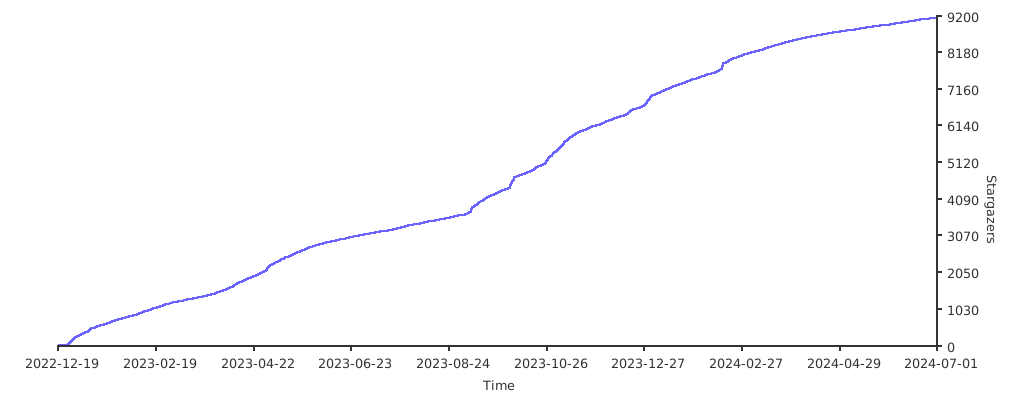](https://starchart.cc/Flipper-XFW/Xtreme-Firmware)
|
|
|
|
----
|
|
<h2 align="center">Contributors</h2>
|
|
|
|
[](https://github.com/Flipper-XFW/Xtreme-Firmware/graphs/contributors)
|
|
|
|
|
|
## ❤️ Support
|
|
If you like what you're seeing, **please consider donating to us**. We won't ever put this behind a paywall, but we'd still appreciate a few bucks!
|
|
|
|
- **[Patreon](https://patreon.com/CynthiaLabs)**: ❤️ Account needed, subscription with perks across my entire org.
|
|
- **[Wire-transfer](https://bunq.me/ClaraK)**: No account needed, one-time
|
|
- **[Paypal](https://paypal.me/RdX2020)**: Account needed, one-time
|
|
- **[ko-fi](https://ko-fi.com/cynthialabs)**: No account needed, one-time
|
|
- **Monero**: `41kyWeeoVdK4quzQ4M9ikVGs6tCQCLfdx8jLExTNsAu2SF1QAyDqRdjfGM6EL8L9NpXwt89HJeAoGf1aoArk7nDr4AMMV4T`
|
|
|
|
**Thanks for all your support <3**
|
|
|
|
----
|
|
<p align="center"> "What we do for ourselves dies with us. What we do for others and the world remains and is immortal.” ― Albert Pine </p>
|