 65df2e4d1f
* adding smartrider_parser

* adding SmartRider parser

new parser for SmartRider cards, a public transport smart card system used in Western Australia.
extracts and interprets key information from the card, including:
-Current balance
-Card serial number
-Concession type
-Purchase cost
-Details of the last two trips (including tag on/off status, cost, route, transaction number, and journey number)

* optimising

- removed all logging to simplify output.
- used early returns for clearer error handling.
- optimized setups outside loops to improve memory use.
- simplified flows by removing unnecessary loops.
- placed variables closer to their use for better readability.
- cached data blocks to streamline data handling.
- added a helper function for parsing trips, reducing redundancy.
- corrected loop counter types to avoid compile-time errors.

* cleaning displayed data

- removed transaction (txn) and journey (jrn) numbers to declutter the trip details.
- shortened "previous trip" to "prev trip" to optimize screen space usage.

* added and refined displayed data

added auto load field "threshold amount / reload amount"
changed serial to display first two digits as SR0 for consistency with physical card.

* Format

* Improved Verification Process

- Added definitions for STANDARD_KEY_2 and STANDARD_KEY_3
- Enhanced smartrider_verify function to check for all three specific keys:
  - STANDARD_KEY_1 in Sector 0 as Key A
  - STANDARD_KEY_2 in Sector 6 as Key A
  - STANDARD_KEY_3 in Sector 6 as Key B
- Implemented read operations to verify actual key values stored on the card
- Added comparisons between read key data and expected key values
- Improved debug logging for each step of the verification process

* Integrated Verification into Parse Function

- Added key verification for sectors 0 and 6
- Implemented do-while loop structure for early exit on verification failure
- Moved block readability checks inside verification process
- Added parsed flag to indicate successful parsing
- Updated return value to reflect parsing success
- Maintained existing parsing logic and output format

* fixed false positives

recieved some cuid cards today so was able to test for myself can confirm works... finally
changes made:
-updated key assignment in smartrider_read
-simplified key verification in smartrider_parse
-improved error handling and logging
-streamlined data parsing process
-corrected key checking logic
-added checks for required block readability
-improved flow control with strategic breaks
-adjusted block data access method

* small optimizations

- refactored `smartrider_verify` and `smartrider_read` by abstracting repeated key operations into `authenticate_and_read` function for improved code maintainability.
- optimized `smartrider_read` by introducing a loop for key setup, reducing redundancy and improving efficiency.
- streamlined error handling in `smartrider_read` by replacing do-while loop with conditional checks.
- changed standard key references to use `standard_keys` array indices

* formatting

* Delete duplicate smartrider.c

* updated smartrider.c

* found 'fbt format'

* transaction parsing updates

-removed last trip/prev trip wording and replaced with "Trip History" header
-added date in front of each transaction
-only shows transaction cost if it's higher than 0
-changed tag on/tag off to +/- to save room
-added 8 more transactions to Trip History
-verified still working and formatted with fbt

* fixed reboot with partially unlocked card

-added bounds checking for all block accesses to prevent out-of-range memory access
-implemented improved error handling with an error_occurred flag
-introduced a maximum iteration count for date calculation to prevent infinite loops
-used snprintf with size limits for all string operations to avoid buffer overflows
-added validation for trip count to ensure it doesn't exceed the maximum allowed
-implemented checks to skip unread or out-of-range blocks during trip parsing
-added safeguards against corrupted or invalid timestamp data

* optimized SmartRider card parsing and verification

- replaced do-while loop with direct error checks in smartrider_parse
- optimized key verification using direct memcmp in smartrider_verify
- introduced inline functions for common operations (e.g., set_key, read_le16)
- replaced bubble sort with insertion sort for trip data
- simplified date calculation using a lookup table for days in month
- used uint_fast8_t for loop counters to allow compiler optimization
- added __attribute__((hot)) to key functions for aggressive optimization
- removed redundant variable declarations and function calls
- optimized memory usage with static const arrays for required blocks
- simplified error handling in smartrider_read and authenticate_and_read
- used __builtin_memcpy and __builtin_memcmp for potential compiler optimizations
- tested and formatted with fbt

* small fixes

-renamed "Trip History" to "Tag On/Off History"
-fixed date calculation to account for leap years
-misc changes

* Update changelog

---------

Co-authored-by: Willy-JL <49810075+Willy-JL@users.noreply.github.com>

for Flipper Zero
Install | Features | Discord | Donate
This custom firmware is based on the Official Firmware, and includes most of the awesome features from Unleashed. It is a direct continuation of the Xtreme firmware, built by the same (and only) developers who made that project special.
Modus Operandi:
The goal of this firmware is to constantly push the bounds of what is possible with Flipper Zero, driving the innovation of many new groundbreaking features, while maintaining the easiest and most customizable user experience of any firmware. Fixing bugs promptly and ensuring a stable and compatible system is also of our utmost importance.
-
Feature-rich: We include all third-party features and apps as long as they fulfill a useful purpose and they work correctly, aswell as implement ourselves many new exciting functionalities.
-
Stable: We ensure the most stable experience possible by having an actual understanding of what's going on, and proactively making all tweaks and additions backwards-, and inter-, compatible.
-
Customizable: You can tweak just about everything you see: add/remove apps from the menu, change the animations, replace icon graphics, change your Flipper's name, change how the main menu looks, setup different keybinds like never before, and so much more. All on-device, with no complicated configuration.
Note that mentioned below are only a few of our staple additions to the firmware. For a full list check down here.
Momentum Settings:
We offer a powerful and easy-to-use application tailor-made for our firmware, that lets you configure everything you could dream of, and more:


-
Interface: Tweak every part of your Flipper, from the desktop animations, to the main menu, lockscreen behavior, file browser, etc.
-
Protocols: Configure SubGhz settings, add/remove custom frequencies, and setup which GPIO pins are used by different external modules.
-
Misc: Everything else that doesn't fit the previous categories. Change your Flipper's name, XP level, screen options, and configure the RGB backlight.
Animations / Asset Packs:
We created our own improved Animation / Asset system that lets you create and cycle through your own Asset Packs with only a few button presses, allowing you to easily load custom Animations, Icons and Fonts like never before. Think of it as a Theme system that's never been easier.
 You can easily create your own pack, or find some community-made ones on our website or on Discord. Check here for a tutorial on creating your own. Essentially, each
 Asset Pack can configure its own Anims, Icons & Fonts.
 Once you have some asset packs, upload them to your Flipper in
 SD/asset_packs (if you did this right you should see SD/asset_packs/PackName/Anims and/or SD/asset_packs/PackName/Icons). Alternatively, install directly using the website.
 After installing the packs to Flipper, hit the
 Arrow Up button on the main menu and go to Momentum Settings > Interface > Graphics. Here choose which asset pack you want and tweak the other settings how you prefer, then exit the app to reboot and enjoy your fully customized Flipper!
Bad Keyboard:
 BadUSB is a great app, but it lacks Bluetooth connectivity. Bad-KB allows you to toggle between USB and Bluetooth mode for your attacks.
In Bluetooth mode it allows you to spoof the display name and MAC address of the device to whatever you want. Showing up as a portable speaker or a wireless keyboard is easily doable, allowing you to get the attention of your target without needing a cable at hand.
In USB mode it also enables additional functionality to spoof the manufacturer and product names, as well as vendor and product IDs (VID/PID).
List of changes:
There are too many to name them all, this is a non-comprehensive list of the most notable from an end-user perspective. For a more detailed list, you can read through the changelogs and commits/code. Also, you can find a feature comparison with other firmwares on our website.
Note that this repo is always updated with the great work from our friends at Unleashed and the latest changes from OFW. Below are mentioned only our changes that we can actually be credited for, so make sure to check their fantastic additions aswell. And a huge thank you to both teams!
[Added]

- Momentum App (Easy configuration of features and behavior of the firmware)
- Asset Packs (Unparalleled theming and customization)
- More UI customization, redesigns and optimizations
- Bad-Keyboard App
- BLE Spam App
- FindMy Flipper App
- NFC Maker App
- Wardriver App
- File Search across SD Card
- Additional NFC parsers and protocols
- Subdriving (saving GPS coordinates for Sub-GHz)
- Easy spoofing (Name, MAC address, Serial number)
- Video Game Module color configuration right from Flipper
- Enhanced RGB Backlight modes (Full customization & Rainbow mode)
- File management on device (Cut, Copy, Paste, Show, New Dir, etc.)
- Remember Infrared GPIO settings and add IR Blaster support in apps
- Advanced Security measures (Lock on Boot, reset on false pins, etc.)
- Disk Image management (Mount and view image contents, open in Mass Storage)
- Extended JavaScript API (Support for UsbDisk/Mass Storage, File operations)
[Updated]

- Enhanced WiFi support for easiest setup ever
- Extended keyboard with cursor movement and symbols
- File Browser with Sorting, More supported File Types
- Advanced and optimized Level System (Up to 30 levels)
- Desktop Keybind system for full key and press/hold remapping
- Storage backend with instant rename and virtual mounting for disk images
- Weather Station, POCSAG, TPMS protocols and more integrated into Sub-GHz
- Expanded Sub-GHz App (Duplicate detection & Ignore, Autosave, History improvements)
- Improved Error Messages (Showing source file paths)
[Removed]

- Unused Dummy Mode
- Broken or Superfluous apps
Install:
There are 4 methods to install Momentum, we recommend you use the Web Updater, but choose whichever one you prefer:
Web Updater (Chrome)
- Make sure qFlipper is closed
- Open the Web Updater
- Click
Connectand select your Flipper from the list- Click
Flashand wait for the update to complete
Flipper Lab/App (chrome/mobile)
- (Desktop) Make sure qFlipper is closed
- (Mobile) Make sure you have the Flipper Mobile App installed and paired
- Open the latest release page
- Click the
☁️ Flipper Lab/App (chrome/mobile)link- (Desktop) Click
Connectand select your Flipper from the list- (Desktop) Click
Installand wait for the update to complete- (Mobile) Accept the prompt to open the link in the Flipper Mobile App
- (Mobile) Confirm to proceed with the install and wait for the update to complete
qFlipper Package (.tgz)
- Download the qFlipper package (.tgz) from the latest release page
- Make sure the
WebUpdaterandlab.flipper.netare closed- Open qFlipper and connect your Flipper
- Click
Install from file- Select the .tgz you downloaded and wait for the update to complete
Zipped Archive (.zip)
- Download the zipped archive (.zip) from the latest release page
- Extract the archive. This is now your new Firmware folder
- Open qFlipper, head to
SD/updateand simply move the firmware folder there- On the Flipper, hit the
Arrow Downbutton, this will get you to the file menu. In there simply search for your updates folder- Inside that folder, select the Firmware you just moved onto it, and run the file thats simply called
Update
Build it yourself:
To download the repository:
$ git clone --recursive --jobs 8 https://github.com/Next-Flip/Momentum-Firmware.git
$ cd Momentum-Firmware/

To flash directly to the Flipper (Needs to be connected via USB, qFlipper closed)
$ ./fbt flash_usb_full

To compile a TGZ package
$ ./fbt updater_package

To build and launch a single app:
$ ./fbt launch APPSRC=your_appid
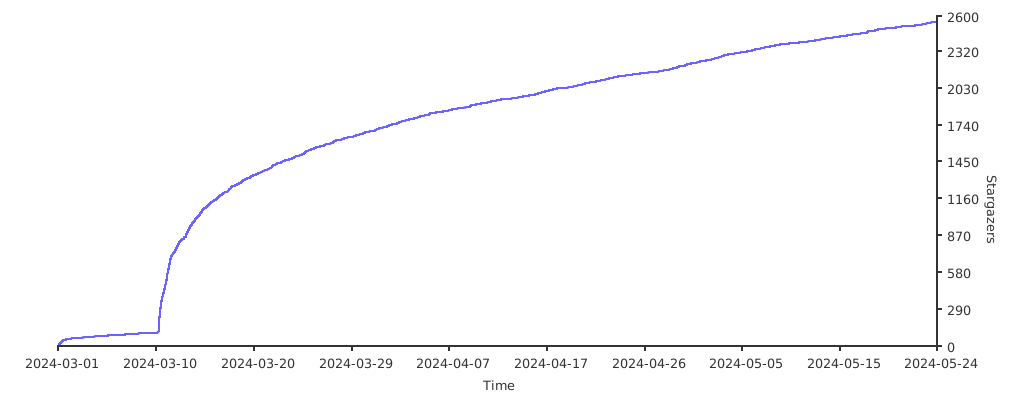
Stargazers over time
❤️ Support
If you enjoy the firmware please spread the word! And if you really love it, maybe consider donating to the team? :D
Ko-fi: One-off or Recurring, No signup required
PayPal: One-off, Signup required
BTC:
1EnCi1HF8Jw6m2dWSUwHLbCRbVBCQSyDKm
Thank you <3