 Willy-JL
XFW - Xtreme Firmware for the Flipper Zero

Intro | Animations | Docs | Changelog | Known bugs | Install | Build | Discord
This firmware is a complete overhaul of the Official Firmware, it also features lots of awesome code-bits from Unleashed.
What makes it special?
We have spent many hours perfecting this code even further, and getting the most out of it.
The goal of this Firmware is to regularly bring out amazing updates based on what the community wants, with an actual understanding of whats going on. Fixing bugs that are regularly talked about, removing unstable / broken applications (.FAP) and actually using the level system that just sits abandoned everywhere else.
-
The focus of this firmware is functionality & stability: If an App doesnt work, its gone
-
Asset Packs: Are you tired of having to remake your custom animations after every update, switching manifests and having a hard time sharing them, especially once you modify scanning assets too? Those times are over. Scroll down to learn more
-
Giving the level system a purpose: Right now, each level unlocks a new wallpaper. More on that below
-
Clean upgraded code: Some people wrote updates to certain files. These are... painful, to say the least. Here its all built with perfection in mind and integrated in a mostly clean way. I invite you all to compare the code with theirs.
-
Up2Date: This firmware receives updates from a few repositories, not just from its Upstream. If there are functional, but yet un-merged Pull requests on another flipper firmware that are good, they will be in here!
Xtreme Settings:
We wrote a powerful yet easy-to-use application specifically for our Firmware, that gives you easy-access to all the fancy things we implemented:

Base Graphics: Change the fallback assets used. Its either SFW (default) or NSFW
Asset Pack: Allows you to easily customize your firmware, more on that below
Anim Speed: Speed in which the animations play
Cycle Anims: Duration of how long animations are played before switching to next
Unlock Anims: Custom setting just for NSFW fallback animations. Figure it out ;)
Battery Icon: Classic Firmware battery style toggle, just at a more convenient place
XP Level: Changes your Flippers level
SubGhz Extend: Allows you to extend the subghz range beyond what FZ devs planned
SubGhz Bypass: Allows you to bypass the subghz region locks of the Flipper
Animations / Asset Packs:
We created our own, new & improved Animation / Asset system, that we can finally reveal. It lets you to create and cycle through your own Asset Packs with only a few button presses, allowing you to easily load custom Animations and Icons like never before.
 You can easily create your own pack, or find some user made ones in the discord channel. Check here for a tutorial on creating your own. Essentially, we got our own
 Anims & Icons folders, inside each Asset Pack.
 Once you have some packs, upload them to your Flipper in
 SD/dolphin_custom (if you did this right you should see SD/dolphin_custom/PackName/Anims and/or SD/dolphin_custom/PackName/Icons).
 After installing the packs to Flipper, hit the
 Arrow UP button on the main menu and go to Xtreme Settings. Here choose which pack you want and tweak the other settings how you prefer, then press back to reboot and enjoy your new assets & animations!
Levels:
This Firmware has 30 levels, not just the basic 3 the official one has.
With this new system in place, it allows for some cool stuff like locking animations behind a certain level. This can be done fairly easy: The idle_animations are tied to the level system. Specifically, the Min level variable of your manifest file is used here. Each level you reach, unlocks a new animation. The higher your level, the more animations people can see.
Our example
In our case, this is used with the NSFW animations. Dont worry, these are disabled by default because I know not everyone likes to see my / anime tits and thats fine. Anyways.. each level gives a brand new background animation, they also become more and more lewd over time. (Funfact for those reading.. thats why the repository has this warning. Github doesnt like my tits :c)
| Level | Animations |
|---|---|
| 1-10 | Try harder. Just sexy clothes |
| 11-20 | Some tits, maybe an ass |
| 21-30 | Fully NSFW, graphic scenes |
List of changes:
Note: This repo is always updated with OFW & Unleashed. No need to mention all those here. We will only mention our changes that we can actually be credited for.
[Added]

- Xtreme App
- Asset Packs
- More UI options
- A new battery display-type
- Scrolling view for long file names in browser
- NSFW Animations tied to the level system. Read more above
- Folder handling for empty ones (Now indicate they are empty)

- Custom subghz presets
- Multiple NFC protocols
- Multiple Sub-Ghz protocols | Merged from Unleashed, thanks @xMasterX
- Subghz and IR signal replication via gpio | Credits to @ankris812
- Honda Keys (CVE-2022-27254) & Ford blockers

- New API Routes for Locale settings
[Updated]

- All Assets

- Tons of apps
- File browser
- Massive compiler re-do
- About 1k files to speed things up a lot
- Applications to now use the new Locale setting
[Fixed]

- Passport crash on high level
- SFW / Dummy_mode getting you XP
- Leveling system
- Mood system
[REMOVED]

- Unused Dummy Mode
- Broken apps (bad apple, chess, etc.)
- Tons of unused code from FAPs and system calls
Install:
This is the recommended install procedure. Please follow these steps EXACTLY and CAREFULLY to ensure you install correctly.
This process will NOT delete any saved files and simply ensures the install goes smoothly.
-
Download the latest release (
.tgz) from the release page -
Open qFlipper and connect your Flipper Zero
-
Go to the files tab, into SD Card, and DELETE THE
appsANDupdateFOLDERS -
Go back to the device tab
-
Click
Install from file...and select the downloaded file (.tgz) -
Enjoy!
If you have issues or crashes with that process, you can try to use Settings > Storage > Factory Reset then retry the install.
Doing that will NOT remove your saved files, it will only forget some settings and paired devices.
Build it yourself:
To download the needed tools:
$ git clone --recursive https://github.com/ClaraCrazy/Flipper-Xtreme.git
$ cd Flipper-Xtreme/

To flash directly to the Flipper (Needs to be connected via USB, qFlipper closed)
$ ./fbt flash_usb

To just compile firmware
$ ./fbt updater_package

If building FAPS:
$ ./fbt fap_dist

If building image assets:
$ ./fbt resources icons dolphin_ext
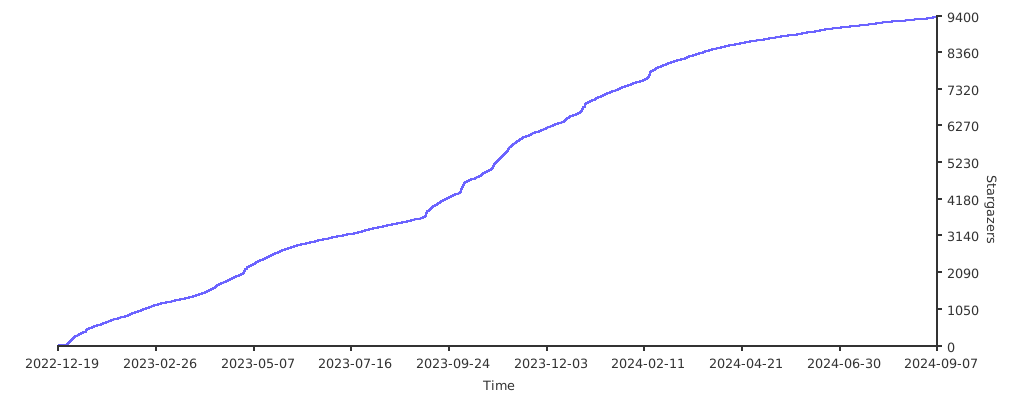
Stargazers over time
Contributors

SAST Tools
This helps us a lot, thanks for the free license for this project!
PVS-Studio - static analyzer for C, C++, C#, and Java code.
"What we do for ourselves dies with us. What we do for others and the world remains and is immortal.” ― Albert Pine